


Swagbucks Play Games + Surveys
4.249.60K Reviews
App Specs
- Version
- 5.54.2
- Updated On
- License
- Free
- Downloads
- 10,000,000+
- Developer
- Prodege
- Categories
- Lifestyle
- Platform
- Android, iOS
Screenshots
 Analysis by AppCompare
I treat Swagbucks Play Games + Surveys as a way to turn spare moments into small rewards, not as a reliable source of income. That distinction matters: the app is free to download, but earning rewards still takes time, and the value depends on which activities suit you and how consistently you use them.
What free access does—and does not—mean
Swagbucks is a free lifestyle app from Prodege. Free access makes it easy to try without paying upfront, but it does not make the time spent on games or surveys costless. I’d judge it by whether the activities fit naturally into breaks I already have, rather than by expecting a meaningful hourly return.
The app has an average rating of 4.2 from around 449,000 ratings, and it has been installed over 10 million times. It is rated Teen, so it is not aimed exclusively at adults. Those figures suggest a well-used rewards app, though popularity alone cannot tell you whether its tasks will be a good match for your interests or schedule.
How Swagbucks fits into everyday use
I use Swagbucks most sensibly when I decide in advance what kind of break I have: a quick game for an interrupted wait, or a survey only when I can stay focused. That simple choice helps keep reward chasing from swallowing the time I meant to relax. It also makes the app’s mix of activities easier to judge against more focused ways to spend a spare moment.
A rewards app, not a paid game
So, what's the buzz with Swagbucks Play Games + Surveys? It’s essentially a rewards app where you can earn points, or "Swagbucks," by playing games, taking surveys, and even watching videos. These points can then be redeemed for gift cards or PayPal cash. Sounds like a win-win, right?
The app is available on both Android and iOS, making it accessible to most smartphone users. Setting it up is a breeze. Just download, sign up, and you’re good to go. The interface is pretty straightforward, which is a huge plus if you’re like me and don’t want to waste time figuring out how things work.
Games Galore
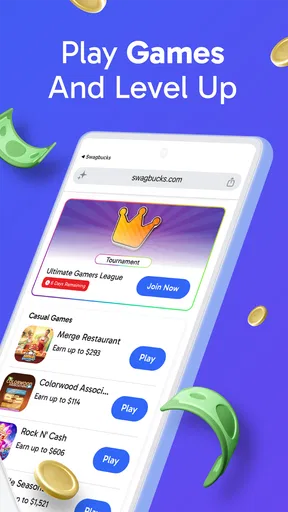
Let’s be real, gaming is the fun part. The app offers a variety of games, from puzzles to strategy games, and yes, the classics too. The selection is decent, but don’t expect the latest blockbusters. The games are more on the casual side, which makes them perfect for quick play sessions while you’re waiting in line or just chilling at home.
Worth Reading Before You Choose

EA SPORTS FC Mobile 26 Is a Bigger Football Game, but It Takes Time

Flipboard Shows What News Apps Must Do Beyond the Feed

Switching to Android Auto Means Rethinking Your Driving Routine

Google Calendar Makes a Crowded Week Easier to Manage

Ludo King Makes the Most of the Minutes Between Plans

Baby Panda World Brings Quick Play to Modern Phones, but Its Game Library Feels Busy
One thing I noticed is that the earnings per game can vary. Some games offer more Swagbucks than others, so it’s worth checking out which ones give you the best bang for your buck. Also, make sure to check the "featured games" section since they often offer bonus points during certain periods.
Survey Time: Is It Worth It?
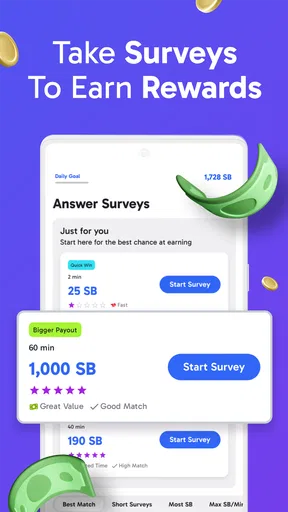
Now, onto the surveys. These are your classic opinion polls, asking about everything from your shopping habits to your favorite TV shows. They usually take a few minutes to complete. The app does a good job of matching surveys to your profile, so you don’t end up with irrelevant questions.
However, be prepared for the inevitable survey disqualifications. It happens, and while it’s a bit of a bummer, it’s common with most survey apps. On the upside, the Swagbucks team tosses a few points your way even if you don’t qualify, which is a nice touch.
Cash or Cards: Redeeming Your Swagbucks
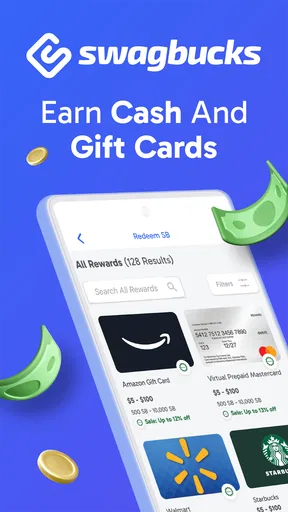
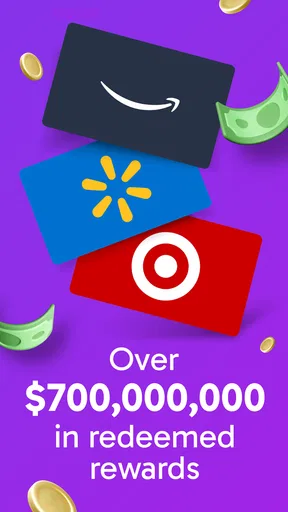
So, once you’ve accumulated enough points, how do you cash out? The app offers several redemption options. You can snag gift cards from popular retailers like Amazon, Walmart, or Starbucks. If you prefer cold hard cash, you can transfer your earnings straight to your PayPal account.
The redemption process is pretty seamless, and the thresholds aren’t too high, which is great if you’re just starting out. One pro tip: keep an eye out for sales or special offers where gift cards can be redeemed for fewer Swagbucks than usual.
Choosing tasks without wasting your downtime
I wouldn’t open the app with a vague goal like “earn as much as possible.” A better routine is to glance at the available options, choose one activity that fits the time you have, and stop when that break is over. Surveys can be a poor fit if you only have a minute or two, since screening questions may take time before you know whether you qualify. A casual game is easier to leave and return to, so it suits short waits better.
For a realistic example, imagine waiting for a delayed appointment. I’d check the task details first, pick a survey only if I had enough uninterrupted time, and avoid starting one just before I needed to leave. If it screened me out, I’d move on instead of repeatedly trying similar surveys. This keeps the app in the role of a small diversion rather than letting it take over a useful break.
It also helps to keep the app’s activities separate in your mind. A game may be enjoyable even when its reward is modest, while a survey is more like a short task that asks for focused attention. I’d choose based on what I actually want from that moment, not just the largest-looking reward; otherwise, a supposedly productive break can turn into time spent on something I don’t enjoy.
How it compares with other ways to earn rewards
Compared with a survey-only app, Swagbucks brings games and videos into the same rewards environment, which gives me more than one kind of activity to choose from. That variety is useful if I tire of questionnaires, but it also means the app is not necessarily the best choice for someone who wants a single, tightly focused survey workflow. People who only want to play games without reward tasks may be happier choosing a regular game instead.
It is also different from a conventional paid mobile game: the point is not simply to buy a game and play through it, but to spend time on activities that can earn redeemable points. I would not install it expecting premium game design or a dependable wage. Its appeal is the chance to collect modest rewards during otherwise idle time, with the trade-off that the tasks and their usefulness can vary.
Trade-offs to consider before settling in
The main friction is uncertainty. A survey can end in a disqualification, and a game’s reward may not be equally appealing to everyone. That makes it worth checking what an activity asks of you before committing. If you dislike answering personal-opinion questions, or you find reward tracking tedious, the basic premise may feel more like work than entertainment.
I’d also avoid treating points as cash in hand before they are redeemed. Rewards are the eventual goal, but getting there requires accumulating enough points and choosing an available redemption option. If you need money quickly for a specific bill, this is not the tool I’d rely on; it is better suited to flexible, low-stakes earning when there is no urgency.
A small practical habit is to check featured games when you are already considering playing, rather than repeatedly opening the app to hunt for the perfect offer. That reduces the temptation to spend extra time chasing changing opportunities. If a task’s requirements or reward do not seem worthwhile to you, skipping it is a sensible choice—not a missed obligation.
Who is most likely to get value?
I’d recommend giving it a try if you enjoy casual games, don’t mind occasional surveys, and like having gift cards or PayPal as possible reward destinations. It can suit someone who wants a low-commitment activity during a commute break, a quiet evening, or another stretch of time that would otherwise be spent scrolling. The strongest fit is a patient user who is comfortable with rewards building gradually.
I’d skip it if you want guaranteed earnings, dislike being screened out of surveys, or only want an uninterrupted gaming experience. It is also a poor match if you need a predictable return for every minute you spend. In those cases, a regular game chosen purely for entertainment—or a more focused option that better matches your preferred task—may be a better use of your time.
One question people naturally have is whether they need to pay to get started: the app itself is free, so there is no purchase required simply to try it. Another is whether it can replace work; I would say no. The rewards are better treated as a small extra than as income to budget around. And if you are deciding between a gift card and cash, the app offers both kinds of redemption, so the practical choice is whichever option you would genuinely use.
Is It Really Worth Your Time?
Alright, so the big question: should you invest your time in Swagbucks Play Games + Surveys? If you’re looking for a way to earn a few extra bucks during your downtime, then yes, it could be worth a shot. It’s not going to replace your day job, but it’s a fun way to earn rewards while doing things you might already enjoy.
The app is straightforward and user-friendly, and there’s a decent variety of activities to keep you engaged. Just remember, patience is key. It might take a bit to accumulate enough points for a significant reward, but hey, every little bit counts, right?
So, if you’ve got some spare time and don’t mind multitasking while you earn, give Swagbucks Play Games + Surveys a whirl. Who knows, your next cup of coffee might just be on them!
My take on the version and long-term use
The app’s current version is 5.51, and it runs on Android 8.0 or later. That makes the platform requirements worth checking before you set aside time to build up a balance. Swagbucks first appeared on October 9, 2013, so it is an established service rather than a brand-new experiment; still, I’d make my own decision based on whether the current mix of tasks works for me.
There are around 49,000 written reviews, alongside the much larger pool of ratings. I take that as useful context, not a promise that every user gets the same selection or has the same experience. For me, the sensible approach is to try a few different activities, notice which ones feel worthwhile, and then make the app a small part of downtime only if it remains enjoyable.
My verdict is a qualified yes: because access is free, there is little purchase risk in trying it, but the real cost is your attention. I’d use it for casual rewards, not as a financial plan, and I’d stop if the tasks start feeling like chores. If that boundary sounds reasonable to you, Swagbucks can be a handy extra; if you expect guaranteed cash for every session, choose something else.
Pros
- Easy to use interface for quick navigation.
- Earn rewards for playing simple games.
- Wide variety of survey topics available.
- Frequent updates with new games and surveys.
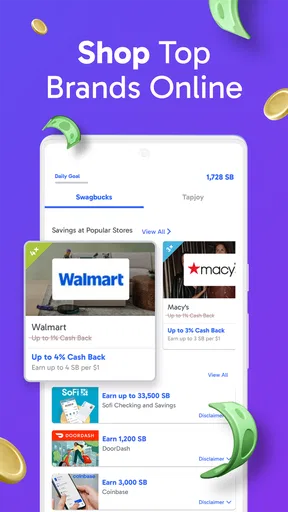
- Integrates smoothly with other reward platforms.
Cons
- Limited earning potential per task.
- Some surveys can be lengthy.
- Rewards may take time to process.
- Not all games are equally engaging.
- Requires stable internet connection.
FAQs for Swagbucks Play Games + Surveys
What is Swagbucks Play Games + Surveys?
Swagbucks Play Games + Surveys is a versatile app that allows users to earn rewards by playing games and completing surveys. It combines entertainment with the opportunity to earn points, known as Swagbucks, which can be redeemed for gift cards or cash. The app provides a simple way to make use of your downtime productively.
How do I earn rewards on Swagbucks Play Games + Surveys?
You can earn rewards by engaging with various activities offered in the app, including playing games, completing surveys, and watching videos. Each activity earns you Swagbucks, the in-app currency, which can then be redeemed for a variety of rewards such as gift cards or PayPal cash. The more you engage, the more you earn.
Is Swagbucks Play Games + Surveys free to use?
Yes, Swagbucks Play Games + Surveys is completely free to download and use. There are no hidden fees or subscription costs. However, while the app itself is free, some games or surveys might offer in-app purchases or require additional tasks for extra rewards. Always review the terms before proceeding.
How can I redeem my Swagbucks points?
Once you have accumulated enough Swagbucks, you can redeem them for a variety of rewards. These include gift cards to popular retailers like Amazon, Walmart, and Starbucks, or you can choose to receive cash through PayPal. The app provides a straightforward redemption process within the rewards section.
Are there any age restrictions for using the app?
Yes, users must be at least 13 years old to use Swagbucks Play Games + Surveys. If you are under 18, you should have parental consent to create an account and engage with the app. This ensures compliance with privacy regulations and provides a safe environment for younger users.


